
The Docker exec Command
In this post we’ll step inside running containers using the docker exec command.
To see how it works, let’s spin up an nginx container and then connect into it with exec.
docker run -d nginx
Since exec needs the container’s id or name to know where to connect, we list the running containers with docker ps to find it.
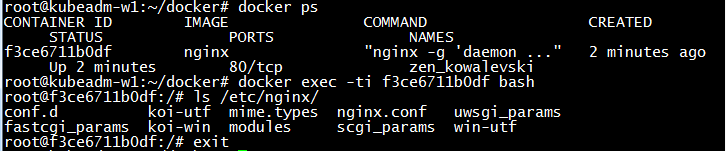
One thing here is easy to forget: if you make changes inside the container through exec, they are not written back to the image file. In other words, the change is not permanent.
– Turkish Version –
Docker exec komutu
Bu yazımızda docker exec komutu ile çalışan containerların içerisine giriyoruz.
Nasıl çalıştığını görmek için bir nginx containerı çalıştıralım ve exec ile içerisine bağlanalım.
docker run -d nginx
exec’in nereye bağlanacağını bilmesi için containerın id veya ismine ihtiyacı olduğundan, bunu bulmak üzere çalışan containerları docker ps ile listeleyelim.
Burada kolayca unutulabilen bir nokta var: exec ile container içinde yaptığınız değişiklikler o image dosyasına yazılmaz. Yani değişiklik kalıcı olmaz.