
Drawing the Koch Snowflake Fractal with OpenGL
Fractals are a great showcase for recursion, and the Koch snowflake is one of the friendliest to start with. In this post we draw the Koch snowflake fractal using FreeGLUT.
As that suggests, building the Koch fractal leans on recursive functions. The fractal works by dividing the distance between 2 points into 3 and obtaining an equilateral triangle from these.
Since each side of an equilateral triangle has a 60-degree angle, that geometry translates directly into a function like the one below.
void koch(GLfloat aci,GLfloat uzunluk,int donus)
{
	if(donus==0)
	{
	GLfloat x=0,y=0;

	x = oldx + ((uzunluk) * cos(derece*aci));
	y = oldy + ((uzunluk) * sin(derece*aci));
	glVertex2f(oldx, oldy);
	glVertex2f(x, y);
	oldx = x;
	oldy = y;
	}
	else{
	donus-=1;
	koch(aci,uzunluk,donus);//1.kenar
	koch(aci+60,uzunluk,donus);//2.kenar
	koch(aci-60,uzunluk,donus);//3.kenar
	koch(aci,uzunluk,donus);//4.kenar
	}
}
Calling it is the easy part: a single function call like the one below in our display function is enough.
koch(0,0.05,3);
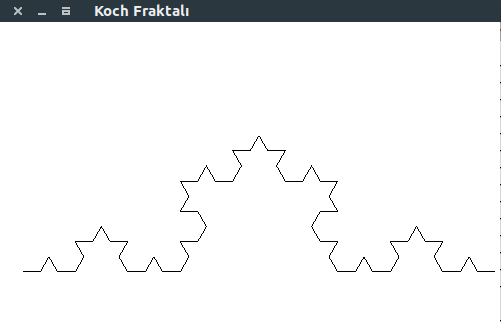
Additional note:
If we add the angles as 120 and -120, we form our fractal not just as the upper part but as a full star shape.
Source : CSCI 4550 – Marcus Young – 9/20/10
– Turkish Version –
OpenGL ile Koch Kar Tanesi Fraktalını Çizmek
Fraktallar recursion için harika bir örnektir ve Koch kar tanesi başlamak için en dostça olanlarından biri. Bu yazımızda FreeGLUT kullanarak Koch kar tanesi fraktalını çiziyoruz.
Bu da gösteriyor ki, Koch fraktalını yaparken recursive fonksiyonlardan yararlanacağız. Fraktal, 2 nokta arasını 3’e bölüp bunlardan birer eşkenar üçgen elde etmemize yarıyor.
Eşkenar üçgenin her bir kenarının açısı 60 derece olduğu için bu geometri doğrudan aşağıdaki gibi bir fonksiyona dönüşüyor.
void koch(GLfloat aci,GLfloat uzunluk,int donus)
{
	if(donus==0)
	{
	GLfloat x=0,y=0;

	x = oldx + ((uzunluk) * cos(derece*aci));
	y = oldy + ((uzunluk) * sin(derece*aci));
	glVertex2f(oldx, oldy);
	glVertex2f(x, y);
	oldx = x;
	oldy = y;
	}
	else{
	donus-=1;
	koch(aci,uzunluk,donus);//1.kenar
	koch(aci+60,uzunluk,donus);//2.kenar
	koch(aci-60,uzunluk,donus);//3.kenar
	koch(aci,uzunluk,donus);//4.kenar
	}
}
Çağırmak ise işin kolay kısmı: display fonksiyonumuza aşağıdaki gibi tek bir fonksiyon çağrısı yeterli olacaktır.
koch(0,0.05,3);
Ek not:
Açılarımızı 120 ve -120 olarak ekleme yaparsak fraktalımızı sadece üst kısım değil tam bir yıldız şeklinde oluştururuz.
Kaynak : CSCI 4550 – Marcus Young – 9/20/10