
C# Graphics Programming – "I Became an Architect"
In this post we will build a house on a three-dimensional plane, and then examine its view using orthographic projection techniques.
To get our bearings, let’s first imagine a three-dimensional plane.
src: https://www.quora.com/Could-there-be-variants-of-the-3D-universe
Now let’s place our house on this plane and add the coordinates to our code.
I copied them into an array of a struct type named p that I had created earlier. This struct takes 4 values, where the 4th value is there for homogeneity. The ‘z’ part is the depth, that is, our 3rd dimension.
int x, y, z;
            x = 0;
            y = -100;
            z = 0;
            p[0].x = x;     p[0].y = y;         p[0].z = z;         p[0].w = 1;
            p[1].x = x+200; p[1].y = y;         p[1].z = z;         p[1].w = 1;
            p[2].x = x+200; p[2].y = y + 200;   p[2].z = z;         p[2].w = 1;
            p[3].x = x;     p[3].y = y + 200;   p[3].z = z;         p[3].w = 1;
            p[4].x = x+200; p[4].y = y;         p[4].z = z - 400;   p[4].w = 1;
            p[5].x = x+200; p[5].y = y + 200;   p[5].z = z - 400;   p[5].w = 1;
            p[6].x = x;     p[6].y = y + 200;   p[6].z = z - 400;   p[6].w = 1;
            p[7].x = x;     p[7].y = y;         p[7].z = z - 400;   p[7].w = 1;
            p[8].x = x+100; p[8].y = y + 280;   p[8].z = z;         p[8].w = 1;
            p[9].x = x+100; p[9].y = y + 280;   p[9].z = z - 400;   p[9].w = 1;
With the points in place, it is just a matter of joining them, as if connecting the dots in a puzzle,
DrawLine(kalem1, (int)p[0].x, (int)p[0].y, (int)p[1].x, (int)p[1].y);
and we draw the lines with the DrawLine command.
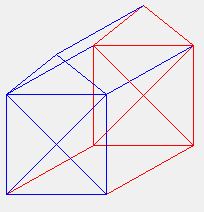
At this stage, if we do not project from an angle (Oblique Projection), we can only see the 2-dimensional front view.
So next we determine our projection and our viewpoint.
This is where the matrix comes in: we multiply our points by it, performing the operation according to the angle we determined.
– Additional code and the written forms of the multiplication will be added here.
We obtain its final form like this.
– Turkish Version –
C# Grafik Programlama – “Mimar oldum”
Bu yazımızda 3 boyutlu bir düzlemde ev yapacağız, ardından bu evi ortografik projeksiyon teknikleriyle inceleyeceğiz.
Konuya yerleşmek için önce 3 boyutlu bir düzlem düşünelim.
src: https://www.quora.com/Could-there-be-variants-of-the-3D-universe
Şimdi bu düzleme evimizi yerleştirelim ve koordinatları kodumuza ekleyelim.
Ben daha önceden oluşturduğum p adlı bir struct tipinde diziye aktardım. Bu struct 4 değer alıyor ve 4. değerimiz homojenlik için orada. Buradaki ‘z’ kısmı derinlik, yani 3. boyutumuz.
int x, y, z;
            x = 0;
            y = -100;
            z = 0;
            p[0].x = x;     p[0].y = y;         p[0].z = z;         p[0].w = 1;
            p[1].x = x+200; p[1].y = y;         p[1].z = z;         p[1].w = 1;
            p[2].x = x+200; p[2].y = y + 200;   p[2].z = z;         p[2].w = 1;
            p[3].x = x;     p[3].y = y + 200;   p[3].z = z;         p[3].w = 1;
            p[4].x = x+200; p[4].y = y;         p[4].z = z - 400;   p[4].w = 1;
            p[5].x = x+200; p[5].y = y + 200;   p[5].z = z - 400;   p[5].w = 1;
            p[6].x = x;     p[6].y = y + 200;   p[6].z = z - 400;   p[6].w = 1;
            p[7].x = x;     p[7].y = y;         p[7].z = z - 400;   p[7].w = 1;
            p[8].x = x+100; p[8].y = y + 280;   p[8].z = z;         p[8].w = 1;
            p[9].x = x+100; p[9].y = y + 280;   p[9].z = z - 400;   p[9].w = 1;
Noktalar yerine oturduktan sonra geriye, bulmacada noktaları birleştiriyormuşuz gibi onları bağlamak kalıyor,
DrawLine(kalem1, (int)p[0].x, (int)p[0].y, (int)p[1].x, (int)p[1].y);
DrawLine komutuyla çizgileri çekiyoruz.
Bu aşamada eğer bir açıdan projeksiyon yapmazsak (Oblique Projection) sadece 2 boyutlu önden görünüşünü görebiliriz.
Bu yüzden bir sonraki adımda projeksiyonumuzu ve bakış açımızı belirliyoruz.
İşte matris burada devreye giriyor: noktalarımızı onunla çarpıyor ve bunu belirlediğimiz açıya göre yapıyoruz.
– Buraya ek kodlar ve çarpımın yazım halleri eklenecek.
Son halini bu şekilde elde ediyoruz.