
Building an iPhone / iPod / iPad App with Flash CS5.5
Sat, Jan 14, 2012
3-minute read
Building apps for iOS devices used to mean working on a Mac, but that is no longer the only option: you can now put together programs for them with Flash.
Before we start, here is what we need:
- Adobe Flash CS5 or higher
- An iOS device for testing
- The required certificates
With those in hand, let’s begin…
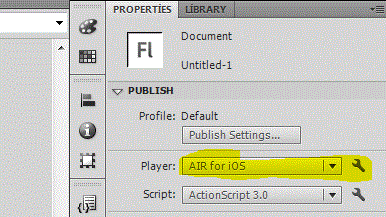
We start by opening Adobe Flash. On the screen that greets us, we pick the “Air for iOS” option.

With the project created, the next thing to sort out is the certificate settings, which live on the right-hand side.
To get there, we click the section I have highlighted in yellow below.
This is where the .p12 and .mobileprovision files come in, since they are what the certificate setup expects. You can generate these with an Apple Developer account, or, if you do not have one, request them from someone who does.
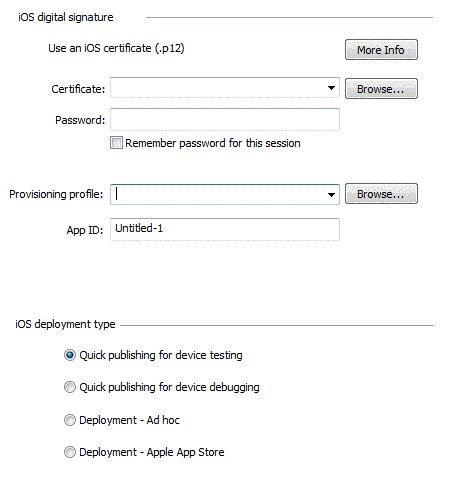
Staying in the same window, we switch over to another tab to reach this section, where we fill in the details about the app, things like whether it should run on the CPU or the GPU…

With the settings out of the way, it is time to design the app itself. I kept mine very simple, just this bit of text, and added a gyroscope so that the text follows along when you tilt the phone…

And with the design done, yes, we go ahead and publish it (Publishing).
Once it lands on the test device, here is how it looks:

And here is the gyroscope in action:

– Turkish Version –
Flash CS5.5 ile iPhone / iPod / iPad Uygulaması Yapmak
iOS cihazları için uygulama yapmak eskiden Mac kullanmayı gerektiriyordu, ama artık tek seçenek bu değil: bu cihazlar için programları Flash ile de hazırlayabiliyorsunuz.
Başlamadan önce gereksinimlerimize bir bakalım:
- Adobe Flash CS5 veya üzeri
- Test için bir iOS cihazı
- Gerekli sertifikalar
Bunlar elimizdeyse başlayabiliriz…
İlk olarak Adobe Flash’ı açıyoruz. Karşımıza gelen ekrandan “Air for iOS” kısmını seçiyoruz.
Proje oluşturulduktan sonra sıra, sağ tarafta yer alan sertifika ayarlarına geliyor.
Oraya ulaşmak için aşağıda sarı renkle belirttiğim bölüme tıklıyoruz.
İşte tam bu noktada .p12 ve .mobileprovision dosyaları devreye giriyor; çünkü sertifika ayarlarının beklediği dosyalar bunlar. Bu dosyaları Apple Developer hesabı ile oluşturabilir ya da hesabınız yoksa bu hesaba sahip olan kişilerden isteyebilirsiniz.
Yine aynı pencerede kalıp farklı bir sekmeye geçerek bu bölüme ulaşıyoruz ve burada uygulamayla ilgili bilgileri giriyoruz; örneğin CPU ile mi yoksa GPU ile mi çalışacağı gibi…
Ayarları hallettikten sonra sıra uygulamanın kendisini tasarlamaya geliyor. Ben çok basit tuttum, sadece bu yazıyı yazdım ve yazıya bir gyroscope ekledim; yani telefonu çevirdiğinizde yazı o yöne gidiyor…
Tasarım da bittiğine göre, evet, uygulamayı yayınlıyoruz (Publishing).
Test cihazına geldiğinde görüntümüz şöyle oluyor:
Ve gyroscope iş başında: